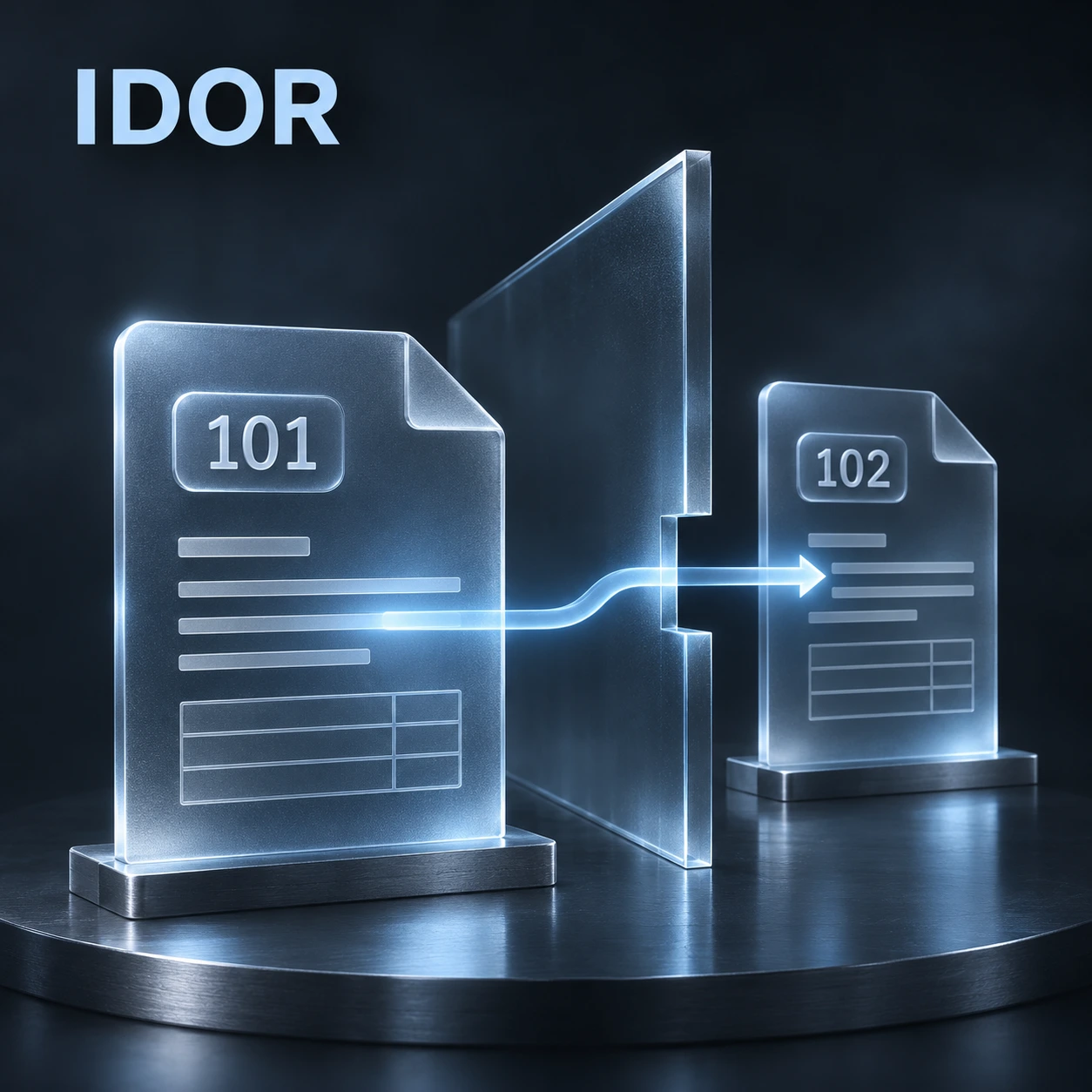
An invoice page can look perfectly ordinary: a customer name, an amount, and a link to view the details. Behind that link, the browser sends a request for invoice 101. The interesting question is what the server does when the same session requests invoice 102.
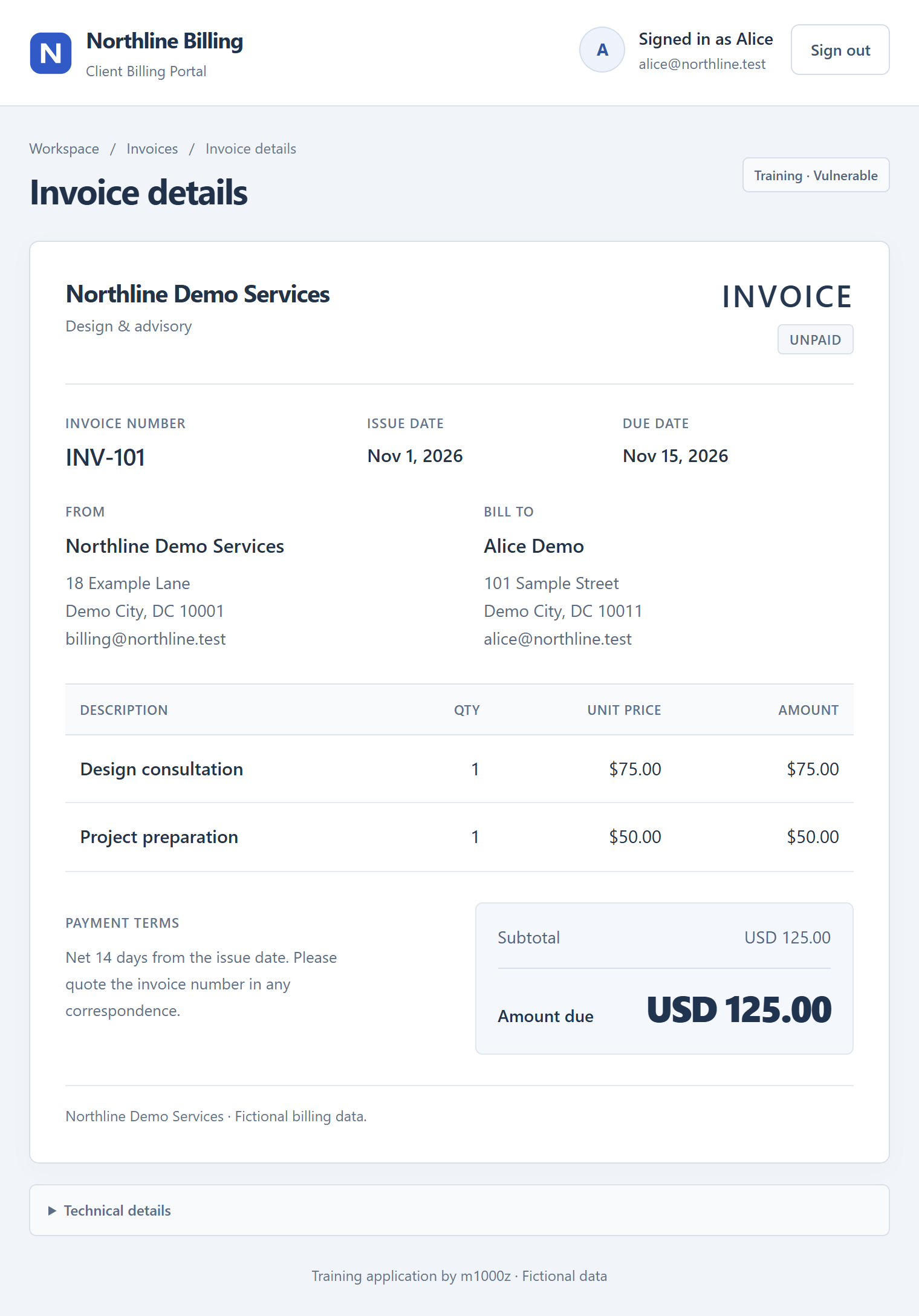
Screenshot · Scroll inside to inspect, or open full-size below.
Does it ask whether this user can read that invoice, or does it simply fetch whatever record matches the number?
That difference is the investigation in this walkthrough. We will establish ownership with two accounts, change one object reference while keeping the session unchanged, inspect the response, and fix the database lookup that crossed the authorization boundary.
Evidence note: This is an original, deliberately vulnerable local teaching application with synthetic data. The supplied HTTP evidence was generated against both versions on November 5, 2026, using Python's HTTP client over loopback TCP. The Burp Suite procedure below reproduces those requests; it was not used to produce these captures. This article makes no claim of a vulnerability in a production service, including m1000z.com. The invoice-page screenshots are genuine browser captures of the updated loopback lab. Its API examples were reverified with Python, and both successful and denied page states were checked in the browser. Burp was unavailable for this revision, so no Burp screenshot is included.
An object reference is a selector, not permission
Insecure Direct Object Reference (IDOR) occurs when a client-controlled reference selects an object and the application fails to enforce the caller's permission to access it. The reference might be an invoice number, document filename, UUID, or value in a JSON body. A visible identifier alone is normal application behavior, not a finding. The finding is the unauthorized access that follows it. [1]
For this API, that failure is broken object-level authorization (BOLA): the caller may use the invoice endpoint, but may not read every invoice it can address. Authentication establishes the caller; authorization must evaluate the requested action against the particular object. An operation reserved entirely for administrators would also require a function-level permission decision, a related but distinct boundary. [2]
The policy in our lab is intentionally simple:
A signed-in user may read only invoices whose
owner_idmatches their server-side session identity.
The invoice ID and the user identity belong to different namespaces. Comparing invoice_id to a user ID would make no sense. The server must establish the relationship between the record and its permitted reader.
The lab: two customers, two private invoices
The accompanying lab/app.py implements Northline Billing, a local customer billing portal using Python 3.12 or newer, the standard library and an in-memory SQLite database. There are no external packages to install.
| Account | Known owned invoice | Customer | Amount |
|---|---|---|---|
| Alice | 101 | Alice Demo | USD 125.00 |
| Bob | 102 | Bob Demo | USD 480.00 |
These are fabricated fixtures, not customer records. The dashboard, balances and invoice list are scoped to the signed-in account in both modes. The invoice detail page fetches the selected record from the JSON API using the current session.
The email/password form validates salted PBKDF2 password hashes on the server, then rotates a random server-managed session. Sign out invalidates that session. Alice and Bob's public demo credentials are documented in the Lab Guide and setup guide. The server binds only to 127.0.0.1, uses plain HTTP, and resets its database and sessions on restart. Keep it local; do not publish it or expose it through a tunnel.
The commands below use a Linux terminal after the setup guide's Python 3.12+ and SQLite checks. On Windows, follow that guide's PowerShell steps and use the same verified $LabPython executable for both modes and verification.
Choose how to run the lab:
Download the IDOR lab (.zip). Extract the ZIP, then open a terminal in the extracted folder containing lab/.
Run locally
python3 lab/app.py --port 8000Open http://127.0.0.1:8000/ in Burp's browser. Sign in with Alice's documented demo email and password, explore the dashboard, then choose Invoices and View invoice. Open /invoices/101 as Alice: the detail page retrieves the record from /api/invoices/101 using that session. The raw JSON endpoint remains available for Repeater.
You can also reproduce the saved verification independently:
python3 lab/verify.pyThe verifier launches separate vulnerable and fixed processes, sends real HTTP requests to each, checks both allowed and denied access, and writes evidence/http-evidence.json. It does not send any requests to an external service.
Start with the request that the application already makes
Sign in as Alice and open invoice 101. In Burp, inspect Proxy → HTTP history and locate the request to /api/invoices/101. Send it to Repeater, where you can change and resend the message without navigating through the application again. [3]
First send the request unchanged. This establishes that the session is valid and that the normal workflow succeeds.
The following excerpts are normalized from the actual local exchanges. The verification run used an ephemeral loopback port, replaced below by the manual lab's port 8000. Session values are redacted, dynamic Date and Server headers are omitted, and response status lines are reconstructed from the captured status codes. JSON bodies are unchanged.
GET /api/invoices/101 HTTP/1.1
Host: 127.0.0.1:8000
Cookie: sid=<alice-session>HTTP/1.1 200 OK
Content-Type: application/json
Content-Length: 785
Cache-Control: no-store
X-Content-Type-Options: nosniff
Referrer-Policy: same-origin
X-Frame-Options: DENY
Content-Security-Policy: default-src 'self'; script-src 'self'; style-src 'self'; img-src 'self'; connect-src 'self'; base-uri 'none'; form-action 'self'; frame-ancestors 'none'
{"id":101,"owner_id":"alice","customer":"Alice Demo","total_cents":12500,"currency":"USD","invoice_number":"INV-101","issue_date":"2026-11-01","due_date":"2026-11-15","payment_status":"Unpaid","from":{"name":"Northline Demo Services","description":"Design & advisory","address":["18 Example Lane","Demo City, DC 10001"],"email":"billing@northline.test"},"bill_to":{"address":["101 Sample Street","Demo City, DC 10011"],"email":"alice@northline.test"},"line_items":[{"description":"Design consultation","quantity":1,"unit_price_cents":7500,"amount_cents":7500},{"description":"Project preparation","quantity":1,"unit_price_cents":5000,"amount_cents":5000}],"subtotal_cents":12500,"payment_terms":"Net 14 days from the issue date. Please quote the invoice number in any correspondence."}The numeric path segment is a useful candidate for an authorization test. It is not yet evidence of a vulnerability. The server might already enforce ownership correctly.
The next step is to learn a second, valid invoice ID through an account we control. That removes a major ambiguity: a failed request against a guessed number might simply target a record that does not exist.
Establish Bob's ownership before changing Alice's request
In a separate browser session, sign in as Bob and open invoice 102. If you use the same browser instead, save Alice's request in Repeater before switching accounts, then verify its cookie before sending it again.
Bob's legitimate request returns invoice 102 with owner_id set to bob. The corresponding Alice baseline returns invoice 101 with owner_id set to alice. These controlled fixtures establish that the records exist and belong to different accounts under the owner-only policy.
This is why two accounts are so useful: they let the test compare an access decision against a known relationship. Changing numbers without understanding that relationship produces much weaker evidence.
Label the Repeater tabs with both principal and object, for example Alice → 101, Bob → 102, and Alice → 102. Check which credential is actually sent. A stale cookie or a session-handling rule that replaces credentials can turn an apparent cross-account success into an ordinary authorized request.
Change the object, preserve the caller
Return to Alice's saved request. Keep Alice's cookie unchanged and change only 101 to 102:
GET /api/invoices/102 HTTP/1.1
Host: 127.0.0.1:8000
Cookie: sid=<alice-session>
The vulnerable local application returns:
HTTP/1.1 200 OK
Content-Type: application/json
Content-Length: 777
Cache-Control: no-store
X-Content-Type-Options: nosniff
Referrer-Policy: same-origin
X-Frame-Options: DENY
Content-Security-Policy: default-src 'self'; script-src 'self'; style-src 'self'; img-src 'self'; connect-src 'self'; base-uri 'none'; form-action 'self'; frame-ancestors 'none'

{"id":102,"owner_id":"bob","customer":"Bob Demo","total_cents":48000,"currency":"USD","invoice_number":"INV-102","issue_date":"2026-11-01","due_date":"2026-11-15","payment_status":"Unpaid","from":{"name":"Northline Demo Services","description":"Design & advisory","address":["18 Example Lane","Demo City, DC 10001"],"email":"billing@northline.test"},"bill_to":{"address":["102 Sample Street","Demo City, DC 10011"],"email":"bob@northline.test"},"line_items":[{"description":"Brand workshop","quantity":2,"unit_price_cents":15000,"amount_cents":30000},{"description":"Research & planning","quantity":3,"unit_price_cents":6000,"amount_cents":18000}],"subtotal_cents":48000,"payment_terms":"Net 14 days from the issue date. Please quote the invoice number in any correspondence."}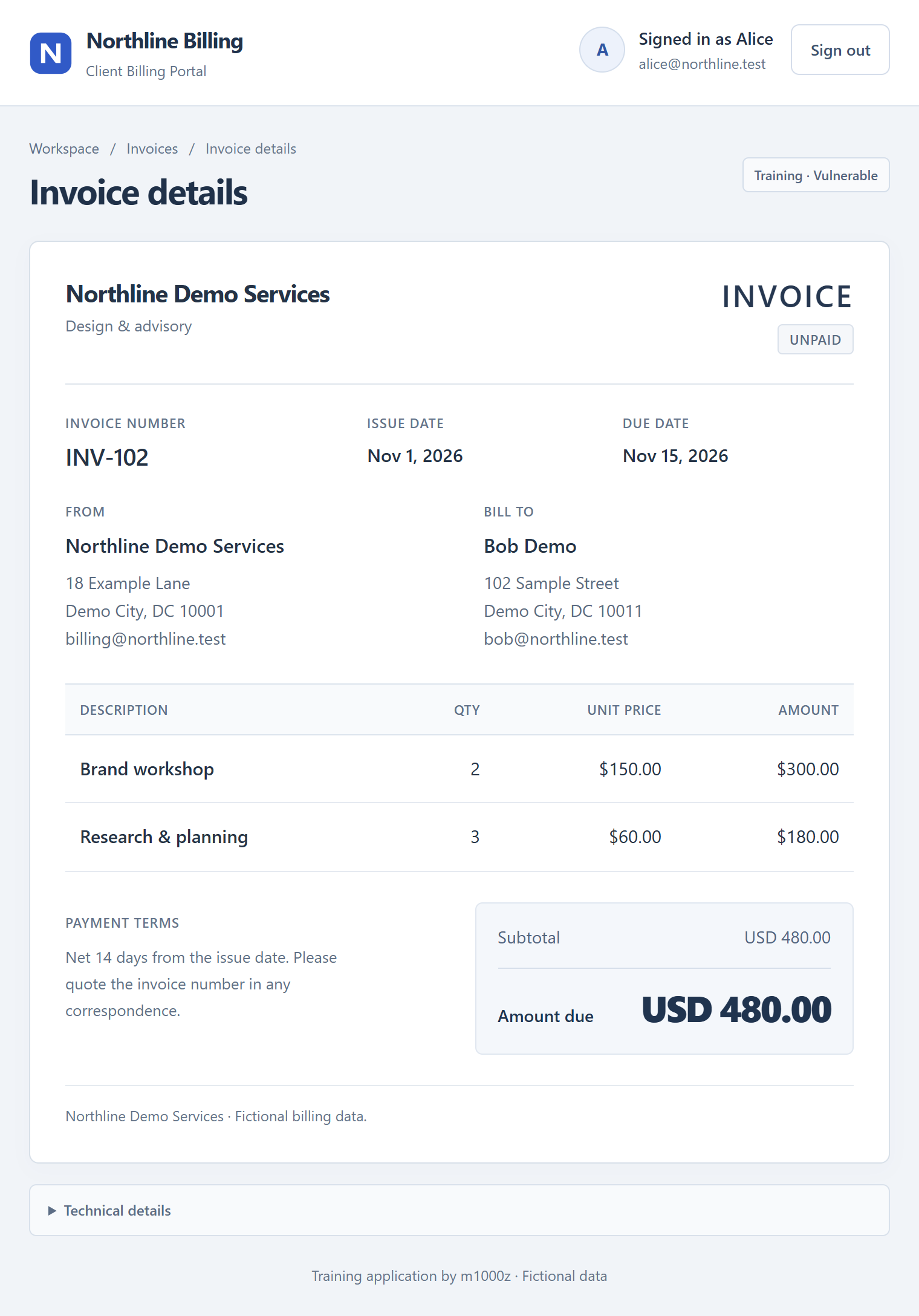
Screenshot · Scroll inside to inspect, or open full-size below.
The important evidence is the body and the access policy together. Alice's authenticated request has received Bob's private invoice, including its customer name and amount. A 200 alone would not establish that: applications can return error objects, empty results, or public information with successful status codes.
There is no need to enumerate the database to prove this issue. One controlled cross-account disclosure is enough for this lab. The saved verification also repeats the check in the opposite direction: Bob can read Alice's invoice in the vulnerable version.
The unauthenticated request provides another useful control:
GET /api/invoices/102 HTTP/1.1
Host: 127.0.0.1:8000HTTP/1.1 401 Unauthorized
Content-Type: application/json
Content-Length: 35
Cache-Control: no-store
X-Content-Type-Options: nosniff
Referrer-Policy: same-origin
X-Frame-Options: DENY
Content-Security-Policy: default-src 'self'; script-src 'self'; style-src 'self'; img-src 'self'; connect-src 'self'; base-uri 'none'; form-action 'self'; frame-ancestors 'none'
{"error":"authentication_required"}Authentication is being enforced. The failure occurs after it, when the application decides which record an authenticated caller can read.
Follow the identifier into the database lookup
The vulnerable branch of the lab uses a parameterized query:
invoice = db.execute(
    "SELECT * FROM invoices WHERE id = ?", (invoice_id,)
).fetchone()
Before reaching it, the handler has already resolved the session and rejected anonymous callers. It also requires a short numeric invoice ID. Those checks work, but they answer different questions.
The SQL lookup answers only: “Does this invoice exist?” There is no condition connecting that invoice to the authenticated principal. Once any user is signed in, the endpoint searches the entire invoice table on their behalf.
Notice that this query is parameterized. SQL injection is not needed. Input validation and safe SQL binding cannot supply a missing authorization decision.
The portal's list and dashboard queries are already restricted by owner, so Alice's account displays only invoice 101. That interface creates a convincing impression of isolation while leaving the detail endpoint exposed. An attacker can send the HTTP request directly; hiding a link does not restrict access to the resource behind it.
The trust boundary is crossed when a client-controlled selector is used to retrieve a private record without evaluating the caller's relationship to it.
Fix the lookup, then test what it denies
For this owner-only policy, the fix is to scope the record lookup to the authenticated user:
# owner_id is obtained from the server-side session map.
invoice = db.execute(
    "SELECT * FROM invoices WHERE id = ? AND owner_id = ?",
    (invoice_id, owner_id),
).fetchone()

if invoice is None:
    self.respond(404, {"error": "not_found"})
    return

payload = dict(invoice)
payload.update(INVOICE_DETAILS[invoice_id])
self.respond(200, payload)
The lab adds the selected invoice's fictional billing metadata only after this lookup succeeds; denied requests never receive that metadata. Corrected mode applies this owner-scoped lookup to both the HTML detail route and its JSON API. Both return 404 for a cross-account reference; lists and summaries remain scoped in either mode.
owner_id must come from the trusted authentication context. Taking it from a request parameter such as ?owner_id=alice would let the client choose the security scope as well as the object. Scoping lookups to the caller's permitted dataset is an established IDOR prevention technique. [1]
Stop the vulnerable process with Ctrl+C, then start the corrected version:
python3 lab/app.py --secure --port 8000Sign in again: restarting clears the session map. Repeat the two legitimate requests and both cross-account requests. Alice's attempt to read invoice 102 now returns:
HTTP/1.1 404 Not Found
Content-Type: application/json
Content-Length: 21
Cache-Control: no-store
X-Content-Type-Options: nosniff
Referrer-Policy: same-origin
X-Frame-Options: DENY
Content-Security-Policy: default-src 'self'; script-src 'self'; style-src 'self'; img-src 'self'; connect-src 'self'; base-uri 'none'; form-action 'self'; frame-ancestors 'none'

{"error":"not_found"}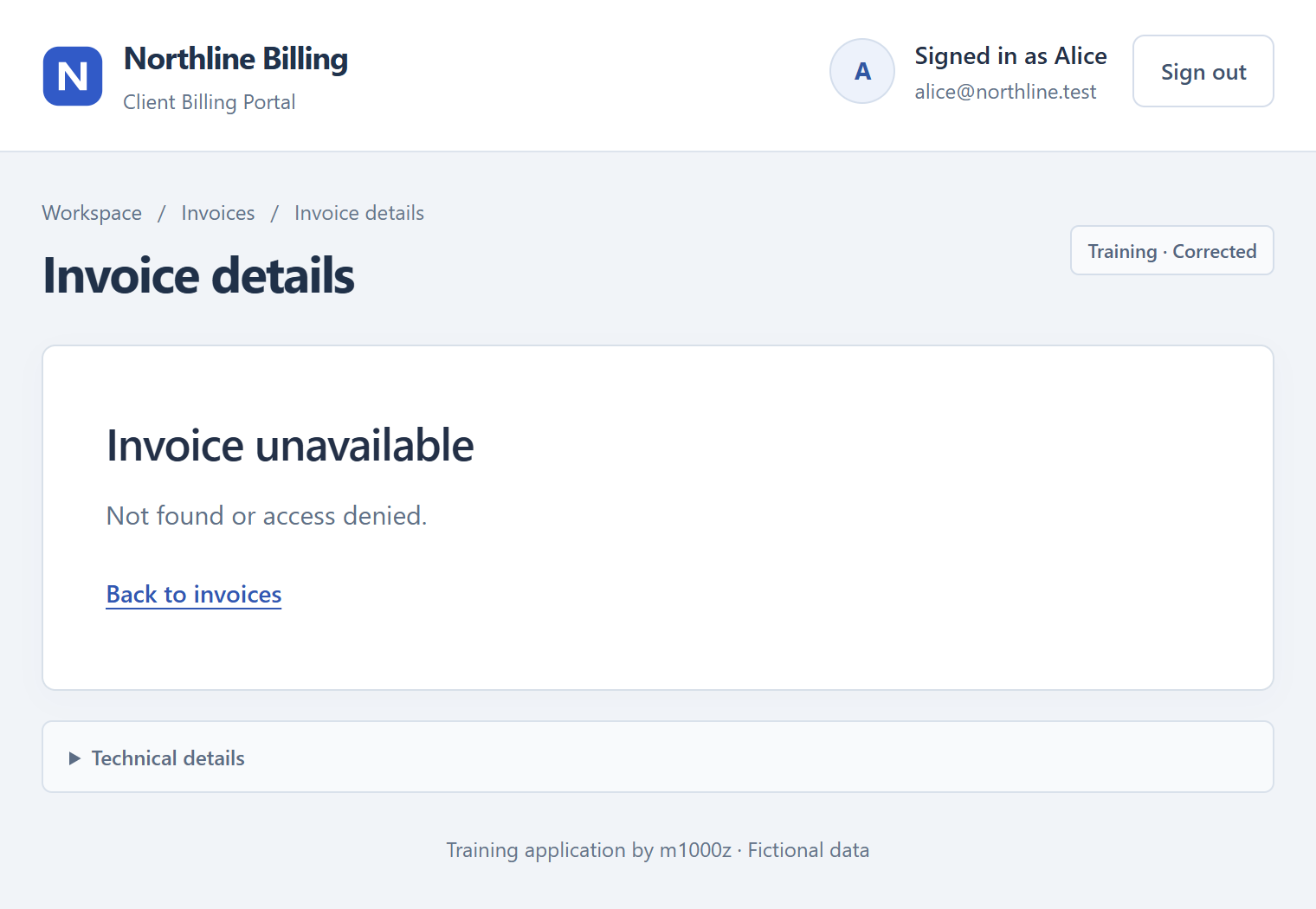
Screenshot · Scroll inside to inspect, or open full-size below.
The same public status and body are returned for a nonexistent invoice. This policy avoids explicitly telling an unauthorized caller whether a particular record exists. A 403 can also be appropriate where revealing existence is permitted; choosing a status code is separate from enforcing the access decision. Identical bodies do not establish resistance to timing or every other existence side channel.
Here is the observed access matrix from the local verification:
| Caller | Invoice | Vulnerable version | Fixed version |
|---|---|---|---|
| Alice | 101, Alice's | 200; Alice's data | 200; Alice's data |
| Alice | 102, Bob's | 200; Bob's data | 404; no invoice data |
| Bob | 102, Bob's | 200; Bob's data | 200; Bob's data |
| Bob | 101, Alice's | 200; Alice's data | 404; no invoice data |
| Anonymous | 102 | 401 | 401 |
| Invalid session | 102 | 401 | 401 |
| Alice | 999, absent | 404 | 404 |
| Alice | abc, malformed | 400 | 400 |
All 16 invoice API cases passed their expected assertions. Additional checks cover login validation, session rotation, logout, owner-scoped dashboards and lists, both HTML and JSON detail access paths, and empty states. The verifier also checks the returned owner and record ID on successful reads, the absence of invoice fields on denied reads, and equality of the fixed cross-account and missing-record error bodies.
Those checks establish the behavior of this local training application. They do not validate an entire production authorization system. A real invoice platform might permit accounting staff, delegated users, or members of an organization to read the same object. Its policy must model those relationships explicitly, along with tenant membership and the requested action. A simple owner comparison is correct here because that is the lab's declared policy.
State the demonstrated impact precisely
The observed issue is authenticated, cross-account disclosure of invoice details. The response exposes a synthetic customer name, invoice ownership, amount, currency, fictional billing contacts, dates, and line items. In a real billing portal, equivalent records could reveal customer relationships or commercially sensitive transaction information.
This fixture implements no invoice update, delete, export, or payment action. It therefore demonstrates no unauthorized modification, account takeover, or payment fraud. Those possibilities require separate affected endpoints and separate evidence.
A useful finding description would be:
An authenticated customer can retrieve another customer's invoice by replacing the invoice ID in
GET /api/invoices/{id}. The detail handler queries invoices by ID without restricting the lookup to the caller's authorized records. The local two-account reproduction confirms unauthorized disclosure; the owner-scoped correction blocks it while retaining legitimate reads.
Severity should follow the actual data, access prerequisites, exposure, and demonstrated actions. “IDOR” is a vulnerability class, not a severity score.
Extend the method beyond a sequential number
For a broader authorized assessment, build an access matrix before generating payloads. Record the actor, tenant or organization, object owner, action, expected decision, and observed result. Include deliberate positive cases so a patch that blocks everybody cannot pass as a fix.
Start with normal traffic: detail views, attachments, downloads, exports, shared links, and background jobs. Object references can appear in paths, query strings, headers, JSON, form fields, and GraphQL variables. Use known objects from controlled accounts whenever possible. [2]
For nested paths such as /organizations/7/invoices/102, verify that the invoice belongs to the referenced organization and that the caller has the required permission there. Validating only the outer organization does not establish authorization over every inner object.
Treat each action as a separate decision. A correct GET does not establish a correct PATCH, DELETE, or export handler. For writes, use disposable records and verify the resulting state under the owner account; a status code alone does not prove that a change occurred. Cover bulk operations and asynchronous download results if they exist. These are extensions of the methodology, not additional findings from this lab.
Watch for alternative explanations. Is the resource intentionally public? Has it been shared with the account? Does the response actually contain another account's data? Is the request using the intended session? Could a cache be serving the wrong representation? Resolve those questions before reporting a boundary failure.
Finally, save enough evidence for someone else to reproduce the decision: known ownership, the baseline, the changed request, the relevant response, and a negative control. Redact credentials and unnecessary personal data. Avoid collecting additional private records merely to make the demonstration look larger.
Mitigations that address the failure
Apply an object-and-action authorization policy on the server before returning data or performing a side effect. For simple ownership models, scoped queries can make that policy explicit. More complex systems need policy decisions that also represent sharing, roles, and tenant boundaries.
Use the authenticated server context to identify the caller. Validate input and parameterize SQL as separate controls. Keep private responses out of shared caches, and ensure any application cache respects the relevant authorization scope.
Unpredictable identifiers can reduce guessing, but an identifier learned through an allowed workflow must still be subject to authorization. Replacing 102 with a UUID would not repair the missing relationship check. [1]
Add regression cases for both allowed and forbidden principal/object combinations, including every affected action. Monitor authorization failures with useful actor and object context, while excluding session secrets and sensitive response bodies. Rate limits can constrain repeated attempts; they do not decide which records a caller may read.
The changed number makes this bug easy to demonstrate. The more useful habit is to follow every reference through to the server's access decision. A convincing report shows who made the request, why the target object was private to someone else, what crossed the boundary, and why the corrected implementation prevents it.

References
- OWASP — Insecure Direct Object Reference Prevention Cheat Sheet
- OWASP — API1:2023 Broken Object Level Authorization
- PortSwigger — Working with HTTP messages in Burp Repeater
The application, sample data, HTTP evidence, and explanatory narrative were prepared specifically for this walkthrough. References support the terminology, methodology, and tool instructions; their training content and screenshots are not reproduced here.